

Schoolyi

Syllabus templates, weekly plans, and study materials

Curriculum & lesson planning

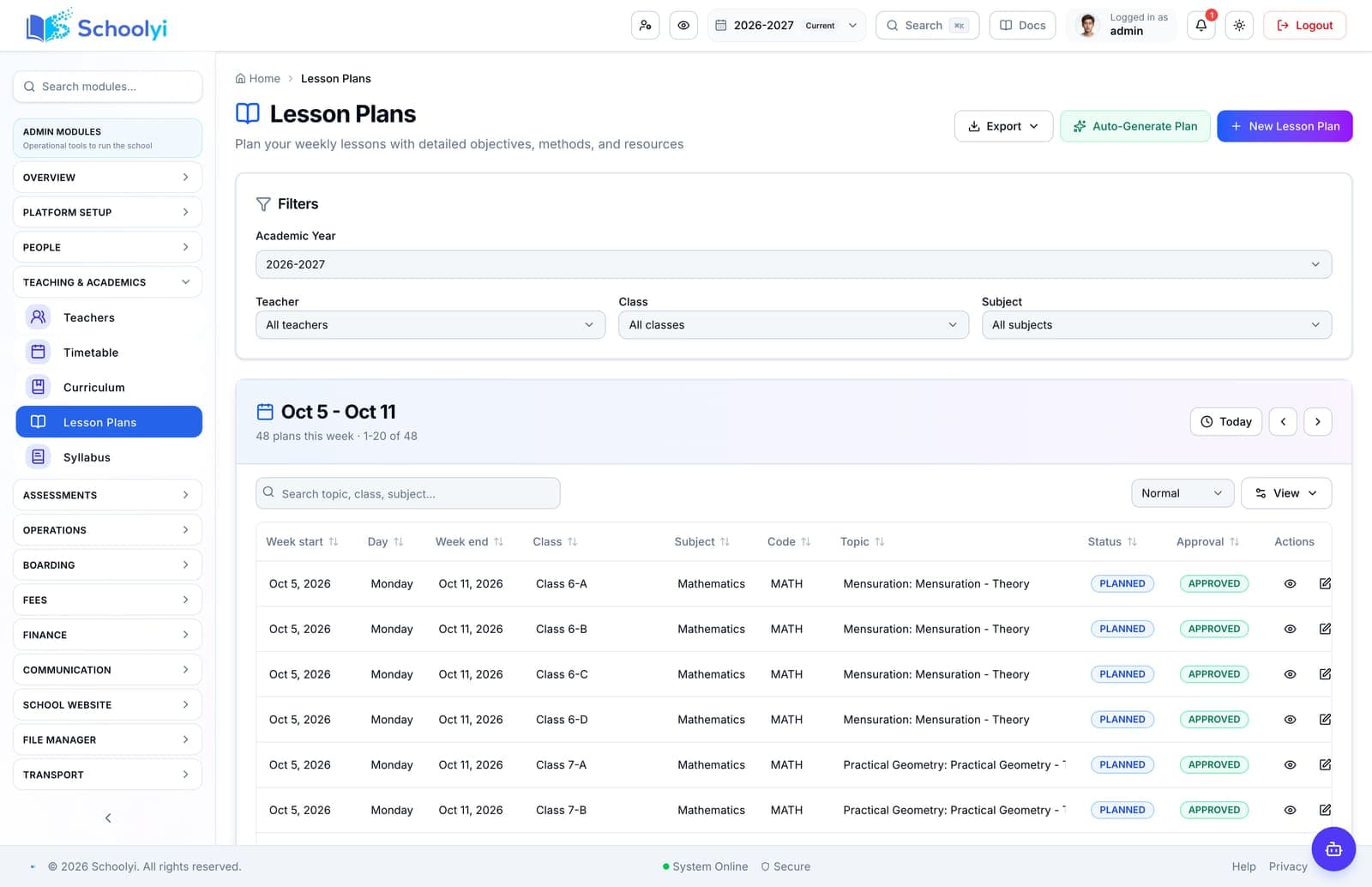
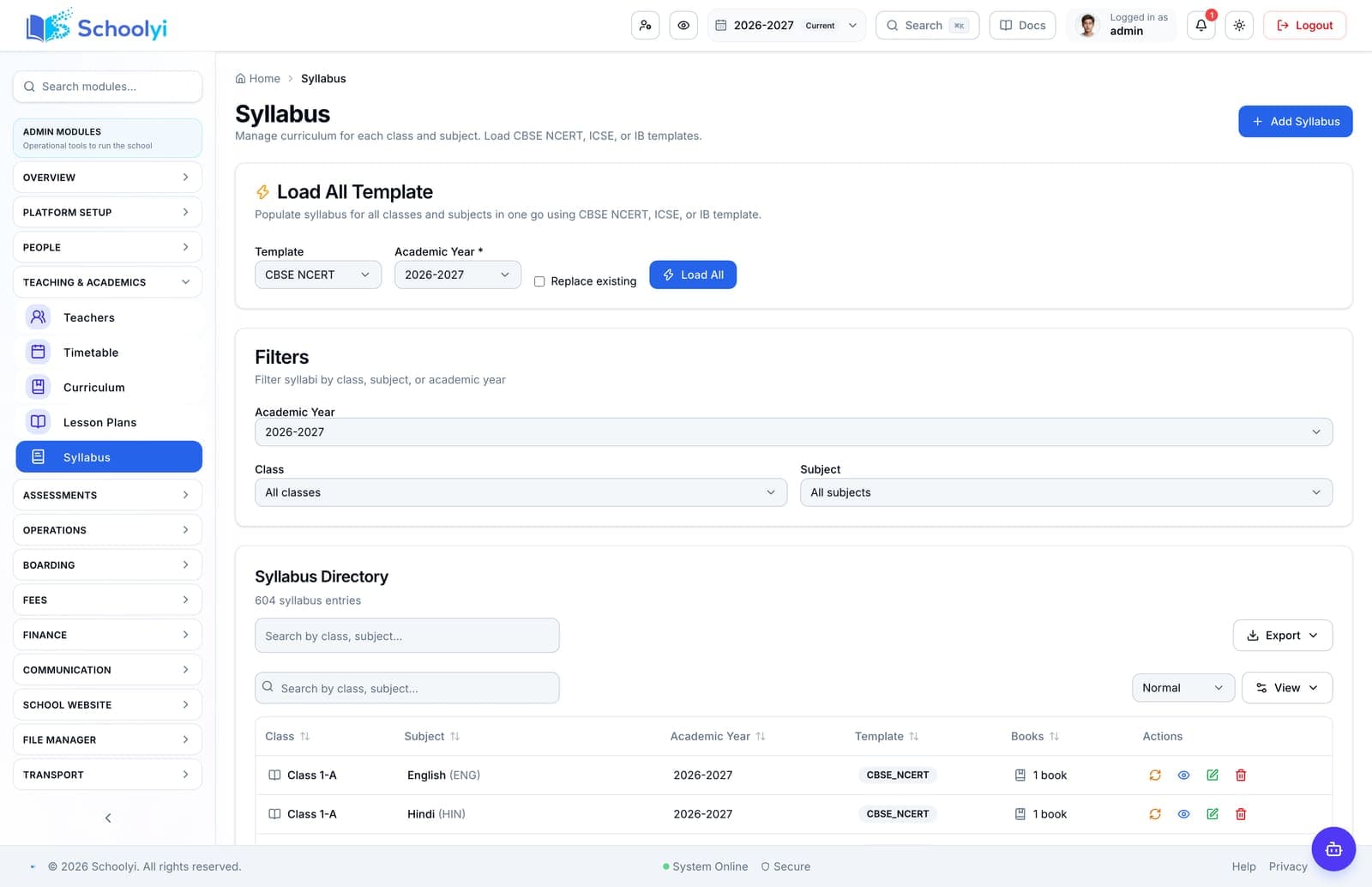
Plan syllabus coverage, weekly lesson plans, and digital study materials against class structure — visible to teachers, learners, and parents where you choose to publish. Curriculum planning should not live in isolated spreadsheets. Schoolyi ties syllabus templates, lesson plans, textbooks, and study materials to classes and subjects so academic heads track coverage while teachers prepare from one source.


Teacher leading a class with timetable visible on screen

Outcomes

What changes when curriculum & lesson planning is live

Practical results schools report after rolling out curriculum & lesson planning inside teaching & timetable.

  • Syllabus templates per class and subject

    Academic coordinators see coverage at a glance

  • Weekly lesson plans linked to calendar weeks

    Teachers reuse syllabus templates across sections

  • Study materials and resource attachments

    Study materials stay tied to the right class

  • Textbook and reference catalog

    Lesson plans respect working days and holidays

Key capabilities

Everything included in this capability, from daily workflows to exports your team relies on.

  • Syllabus templates per class and subject
  • Weekly lesson plans linked to calendar weeks
  • Study materials and resource attachments
  • Textbook and reference catalog
  • Curriculum grid — periods per class
  • Learner and parent views where published

Who uses this

Role-scoped workspaces so each team sees only the tasks they own.

  • Academic coordinators
  • Teachers
  • Department heads

Full module

Teaching & timetable

Define who teaches what, build and publish timetables, handle substitutes, and plan lessons against the same calendar your exams and attendance use, so teachers spend time teaching, not chasing schedules.

Explore Teaching & timetable

Workflow

How teams run curriculum & lesson planning week to week

A typical path from setup through daily use on Schoolyi.

  1. 01

    Syllabus templates per class and subject

    Part of the Curriculum & lesson planning workflow on Schoolyi, connected to roster, calendar, and role permissions.

  2. 02

    Weekly lesson plans linked to calendar weeks

    Part of the Curriculum & lesson planning workflow on Schoolyi, connected to roster, calendar, and role permissions.

  3. 03

    Study materials and resource attachments

    Part of the Curriculum & lesson planning workflow on Schoolyi, connected to roster, calendar, and role permissions.

  4. 04

    Textbook and reference catalog

    Part of the Curriculum & lesson planning workflow on Schoolyi, connected to roster, calendar, and role permissions.

Deep dive

Built for school operations, not generic ERP

Long-form context for evaluators comparing capabilities during an SMS rollout.

Teacher leading a class with timetable visible on screen

Why schools upgrade curriculum & lesson planning

Curriculum planning should not live in isolated spreadsheets. Schoolyi ties syllabus templates, lesson plans, textbooks, and study materials to classes and subjects so academic heads track coverage while teachers prepare from one source.

School principal reviewing reports in a modern office

Connected to teaching & timetable

Plan syllabus coverage, weekly lesson plans, and digital study materials against class structure — visible to teachers, learners, and parents where you choose to publish. Because curriculum & lesson planning lives inside teaching & timetable on Schoolyi, teams stop reconciling exports between spreadsheets and the parent portal.

Related capabilities

These areas work closely with curriculum & lesson planning inside teaching & timetable.

Questions, answered

Straightforward answers for visitors evaluating the product.

Who typically runs curriculum & lesson planning day to day?+

Academic coordinators, Teachers, Department heads own daily workflows while teaching & timetable coordinators review setup and exports when needed.

How does curriculum & lesson planning connect to the academic calendar?+

Plan syllabus coverage, weekly lesson plans, and digital study materials against class structure — visible to teachers, learners, and parents where you choose to publish. Because it shares roster and calendar data with teaching & timetable, teams do not maintain parallel date lists or exports.

Can we roll out curriculum & lesson planning after go-live?+

Yes. Schools often launch teaching & timetable foundation data first, then enable curriculum & lesson planning when coordinators are ready.

Is training required for every role?+

Role-scoped workspaces show only the tasks each team needs for curriculum & lesson planning. Most schools run a short coordinator session plus self-serve operator guides.

Students walking together across a school campus at sunset

See Curriculum & lesson planning in a live walkthrough

We'll show how curriculum & lesson planning fits your school's teaching & timetable workflows and which teams benefit first.

Already using Schoolyi? Sign in